
Quick Start
Oyoroi Jam · about five minutes · assumes you have never played an instrument
You do not need to know what a chord is, and you do not need to learn anything before you start. Open the right song and you are playing inside a minute. Here is the shortest path.
-
Open Tom Dooley
From the song list, scroll down to Tom Dooley and tap it. Its row says 2 chords, which is how you spot the easy ones.
That is why it is first: the whole song is two chords, so the screen you land on has two buttons on it and nothing else to work out.
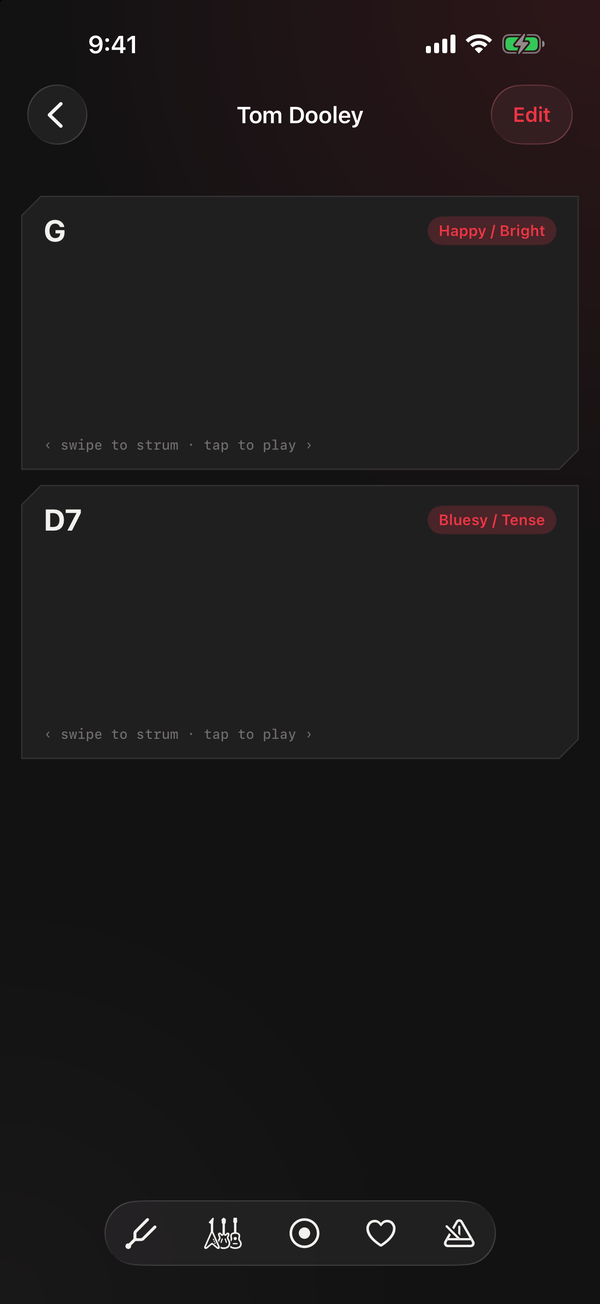
The entire instrument for this song. -
Tap the top pad
Sound comes out. That is a chord, and you just played it. Tap it a few more times.
Ignore the
swipe to strumhint underneath for now. Tapping is a completely valid way to play this, and everything below works with taps alone. -
Now move between the two
This is the only skill there is, and it is the one worth practicing: not what the chords are, but changing from one to the other without stopping.
Count four slow beats while you tap the G pad on each one. Then four beats on D7. Then back to G. Keep going round. Aim for an even count rather than a fast one, and do not stop to fix a mistake, just carry on to the next change.
When that starts feeling automatic, you have the thing that most people quit before reaching.
-
Play the same two chords in another song
Go back and open Boll Weevil. It is also exactly G and D7, the same two pads in the same order.
Nothing new to learn, and a second song out of it. That is the point of the app in miniature.
-
Add two chords, get two more songs
Once G and D7 feel easy, meet C. That alone gets you Worried Man Blues, which is G, C and the D7 you already know.
Then meet D, the plain one without the 7. Will the Circle Be Unbroken is exactly G, C and D, so it opens up too. D and D7 are close relatives and sit right next to each other, so this is less of a jump than it looks.
Two new pads, and your two songs have become four. Most of the bundled library is built from a handful of chords that keep reappearing, which is the whole reason this app shows you a few pads instead of a keyboard.

If you want a metronome to count for you
There is one, and it will follow the song's chords, but it needs turning on per song because the bundled songs ship without a tempo. With a song open: tap Edit, switch on Enable Practice Guide, then Save Changes at the bottom. A metronome button appears in the bar at the bottom of the player.
Switch it on and the app walks the chords in time, ringing the pad you should be on. Start it slower than feels necessary. 90 beats per minute is the default and you can go down from there.
Two things that trip people up
A pad went quiet when you meant to tap it. Sliding sideways across a pad strums it rather than tapping it, which sounds different on purpose. If you would rather that never happened, Settings has a Tap Only option that ignores swipes entirely.
One chord came out quieter than the last. Where you tap across a pad sets how hard it plays: the right side is full strength and the left is soft. That is deliberate, and Settings can turn it off under Velocity by Touch Position if you would rather every tap matched.
The chords are too high or too low to sing along with. That is fixable without changing the song. The tuning fork button at the bottom of the player shifts everything up or down until it suits your voice.